


Autoklose and Salesflare
Automate your way through the sales process and close more deals faster.
How to connect Autoklose
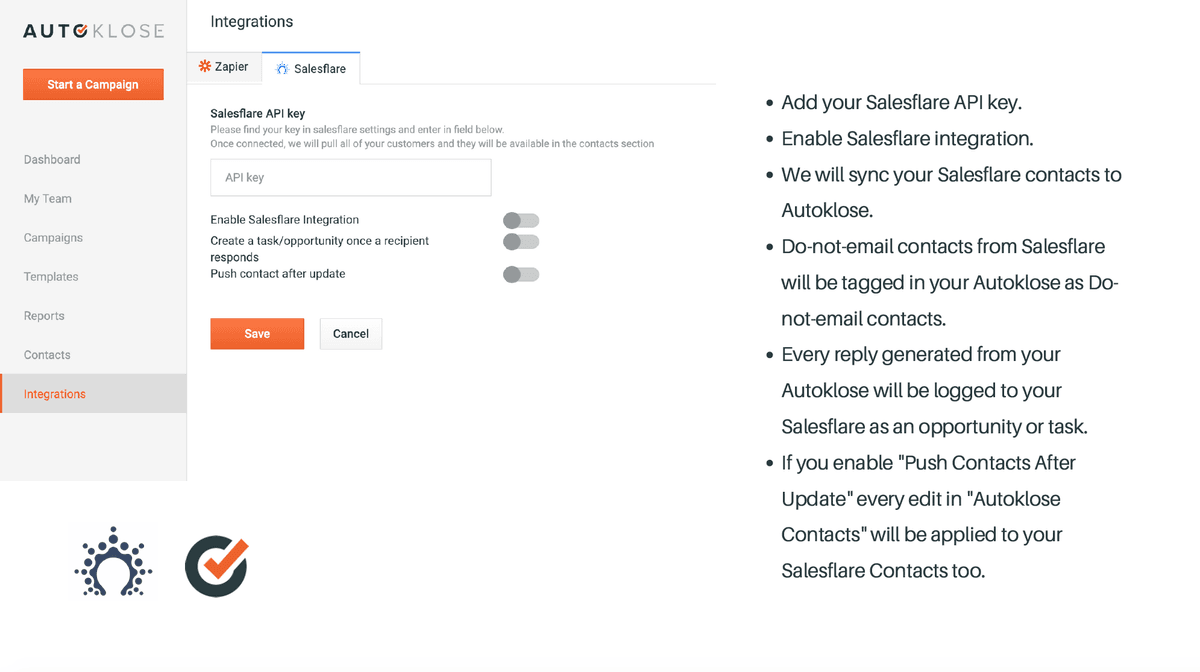
- Natively — Built directly into Salesflare.
- Via Zapier — 11 operations available. Set it up ↗
What you can automate
- When new Email Open in Autoklose, find or create contact in Salesflare.
- When new Email Reply in Autoklose, find or create contact in Salesflare.
- When new Email Send in Autoklose, find or create contact in Salesflare.
- When new Email Click in Autoklose, find or create contact in Salesflare.
- When new Reply Tagged in Autoklose, create internal note in Salesflare.
About Autoklose
Autoklose is a sales platform that automates email followup and outreach to boost your team’s productivity and performance.
Features
- Real-Time Reporting and Email Tracking
Monitor your rates and take smart action
- Contact Management
Effectively manage your contacts!
- Email Campaign Management
Send automated, highly personalized and engaging emails
- Email Sequence Templates
Save the best sequence & get better results
- Sales Intelligence and Data
Take advantage of a large database packed with millions of contacts
- Team Management
Create teams and track performance
- Time-Saving Tools
Make your inbox work for you
Pricing
Autoklose no longer publishes a stable public plan price. Subscription and extra-seat pricing is handled in Billing or through sales. Autoklose Help Center.
Autoklose operations on Zapier
Triggers (8)
Start a workflow when this happens
- New Email Bounce — Triggers when a bounce reply is detected.
- New Email Click — Triggers when a user clicks a link in a campaign email.
- New Email Open — Triggers when a campaign email is opened.
- New Email Reply — Triggers when a user replies to a campaign email.
- New Email Send — Triggers when an email is sent.
Show 3 more triggers
- New Email Unsubscribe — Triggers when a recipients unsubscribes from a campaign email.
- New Reply Tagged — Triggers when a tag is applied to an existing reply.
- New Tag Assigned — Triggers when a tag is applied to an existing contact.
Actions (3)
Things Salesflare can make it do
- Add Campaign Recipient — Adds a campaign recipient.
- Add Recipient to Do Not Email List — Adds a new recipient to a Do Not Email list.
- Remove Campaign Recipient — Removes a campaign recipient.
Screenshots
Similar apps
 Salesflare Email Workflows
 Send email sequences & automated emails from Salesflare
 Drip
Drip Lightweight marketing automation.
 Gmail
Gmail One of the most popular email services.
 Microsoft Outlook
 The world's most popular desktop email program
 Microsoft 365
 Complete office suite in the cloud.
 Zoho Mail
 Zoho Mail is a collaborative business communication platform for the modern workforce. It is a b…
Not using Salesflare yet?
Salesflare is a CRM for small and medium-sized B2B businesses — it fills itself in automatically so your team actually keeps it up to date.
Try it for free