


Microsoft Outlook and Salesflare
The world's most popular desktop email program
How to connect Microsoft Outlook
- Natively — Built directly into Salesflare. Set it up ↗
- Via Zapier — 45 operations available. Set it up ↗
- Via Make — 15 modules available. Set it up ↗
What you can automate
- When new Contact in Microsoft Outlook, find or create contact in Salesflare.
- When new Email in Personal Inbox in Microsoft Outlook, find or create contact in Salesflare.
- When new Email Matching Search in Microsoft Outlook, find or create contact in Salesflare.
- When new Email in Shared Mailbox in Microsoft Outlook, find or create contact in Salesflare.
- When new Flagged Email in Microsoft Outlook, find or create contact in Salesflare.
- When updated Contact in Microsoft Outlook, find or create contact in Salesflare.
About Microsoft Outlook
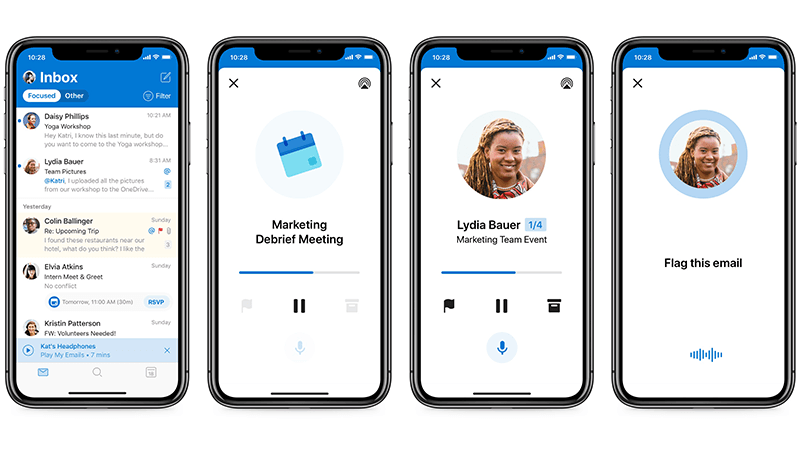
Microsoft Outlook is an all-in-one email and personal information manager that centralizes emails, calendars, contacts, and tasks. Designed for efficiency and ease of use, it ensures seamless synchronization across all devices, helping users stay connected and organized wherever they go.
Features
- Email Management: Efficient handling of multiple email accounts from various providers in one centralized location.
- Calendar Integration: Seamless integration of calendars for easy scheduling, meeting planning, and reminders.
- Contact Organization: Comprehensive contact management that syncs across all devices, helping you keep important details at your fingertips.
- Task Tracking: Built-in task manager that allows for the creation, tracking, and completion of tasks within the app.
- Mobile Accessibility: Full functionality on mobile devices, ensuring access to all features on the go for continuity and productivity.
Pricing
Outlook.com has a free personal tier. The desktop Outlook app and premium features are included with Microsoft 365; Microsoft 365 Personal is €99/year in Belgium, while business plans are priced per user. Current Microsoft 365 pricing.
Microsoft Outlook operations on Zapier
Triggers (13)
Start a workflow when this happens
- Calendar Event Start — Triggers at a specified time before an event in your calendar starts.
- Cancelled Calendar Event — Triggers when an event is cancelled.
- Cancelled Calendar Event (As Attendee) — Triggers when an organizer cancels an event, for which the connected user is an attendee, on the selected calendar. In contrast to the instant Cancelled Calendar Event, this trigger also works with shared and delegated calendars.
- New Attachment — Triggers when there is a new attachment.
- New Calendar Event — Triggers when a new event is created in your calendar.
Show 8 more triggers
- New Contact — Triggers when a new contact is added to your account
- New Email Matching Search — Triggers when a new e-mail is received in your inbox that matches a search.
- New Email in Personal Inbox — Triggers when a new email arrives in your personal mailbox inbox, or in a specific folder if selected.
- New Email in Shared Mailbox — Triggers when a new email arrives in a shared mailbox inbox, or in a specific folder if selected.
- New Flagged Email — Triggers when a new email is flagged.
- New Message in Folder — Triggers when a new message is created in a folder.
- Updated Calendar Event — Triggers when an event is updated.
- Updated Contact — Triggers when a contact is updated.
Actions (25)
Things Salesflare can make it do
- API Request (Beta) — This is an advanced action which makes a raw HTTP request that includes this integration's authentication.
- Add Attendees to Calendar Event — Adds attendees to a calendar event.
- Add User to Distribution List — Adds a user to a distribution list or group. Only available in Microsoft 365 Business accounts that have organizational directories.
- Copy Email — Create a duplicate of an email in a different folder.
- Create Contact — Creates a new contact.
Show 20 more actions
- Create Draft Email — Creates a draft of an email that can then be reviewed and sent out.
- Create Draft Reply — Creates a draft reply for an email.
- Create Event — Create an event in the calendar of your choice.
- Create Folder — Create a new mail folder.
- Delete Contact — Deletes an existing contact.
- Delete Email — Delete an email from a shared or own mailbox.
- Delete Event — Deletes an existing event.
- Find or Create Contact — this is the description.
- Flag / Unflag Email — Update the follow-up flag on an email.
- Forward Email — Forward an email to specific recipients based on rules or conditions.
- Mark Email as Read/Unread — Update the read status of an email.
- Move Email to Folder — Move an email to a specific folder.
- Remove Categories From Email — Remove one or more categories from an email.
- Reply to Email — Creates a new reply to a specified email message.
- Send Draft Email — Send a draft email that was previously created.
- Send Email — Send an email from your Outlook account.
- Set Categories on an Email — Sets the categories applied to an email.
- Set Email Importance — Update an email's importance level.
- Update Calendar Event — Updates a calendar event information.
- Update Contact — Updates a contact.
Searches (7)
Look up existing records
- Find Calendar Events — Finds Calendar Events in your calendar.
- Find Calendar Events in Group Calendar — Finds calendar events in a Microsoft 365 group calendar.
- Find Contacts — Search for contacts.
- Find Emails — Finds emails based on name.
- Find Emails in Specific Folder — Searches for emails within a specific folder rather than across all mailboxes.
Show 2 more searches
- Get Attachment by ID — Retrieves a specific email attachment using its ID.
- Get Calendar Events in Date Range — Retrieves calendar events within a specific date range for reporting and automation (maximum of 500 events returned).
Microsoft Outlook operations on Make
Triggers (1)
Start a workflow when this happens
- Watch Emails — Triggers when a new email is sent or received.
Actions (12)
Things Salesflare can make it do
- Add an Attachment — Adds a large attachment to an email.
- Create a Draft Email — Creates a new draft email.
- Delete an Email — Deletes an email.
- Download an Attachment (legacy) — Downloads an attachment from an email.
- Forward an Email — Forwards an email.
Show 7 more actions
- Get an Email — Gets the metadata of a specified email.
- Make an API Call — Performs an arbitrary authorized API call.
- Move an Email to a Folder — Moves an email to a selected folder in the mailbox.
- Reply to an Email — Replies to the sender of an email.
- Send a Draft Email — Sends a draft email.
- Send an Email — Creates and sends a new email immediately.
- Update an Email — Updates an existing email.
Searches (2)
Look up existing records
- List Attachments — Retrieves a list of attachment from an email.
- Search Emails — Searches for emails.
Screenshots
Similar apps
 Google Calendar
 Google's free online calendar.
 Google Workspace
 Collaboration & Productivity Apps for Business
 Gmail
Gmail One of the most popular email services.
 Microsoft 365
 Complete office suite in the cloud.
 Zoho Mail
 Zoho Mail is a collaborative business communication platform for the modern workforce. It is a b…
 Microsoft Exchange
 Microsoft Exchange Server is a mail server and calendaring server developed by Microsoft.
Not using Salesflare yet?
Salesflare is a CRM for small and medium-sized B2B businesses — it fills itself in automatically so your team actually keeps it up to date.
Try it for free